Ant Evolution Giant Mantis Boss Guide
Prepare for the Giant Mantis, follow a wind-up and counterattack routine, adjust for mobile controls, and understand the dated 199 Robux server summon option.
How do you fight the Giant Mantis in Ant Evolution?
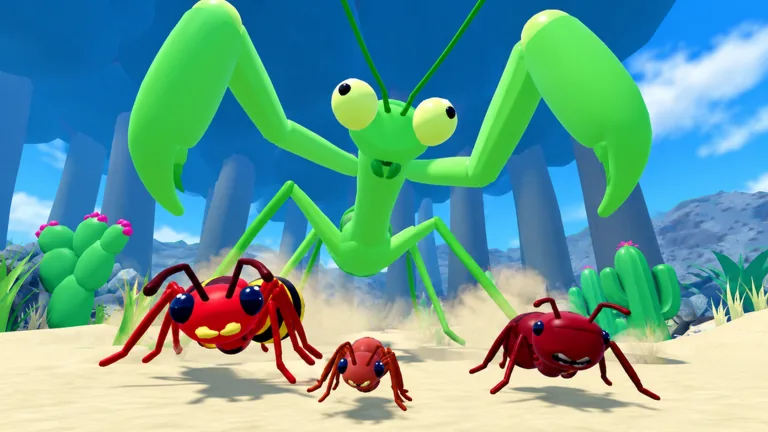
Prepare your ant, approach with room to sidestep, and use short attacks between the Giant Mantis’s wind-ups. Ant Evolutions Wiki recommends watching the wind-up, sidestepping or disengaging, attacking with Bite and a pressure mutation, then repositioning before the next attack. Its mobile guide recommends extra spacing on touch controls. You can also summon the boss for everyone in the server: Ant Evolution Wiki’s November 17, 2026 shop snapshot lists Summon Mantis Boss (Whole Server) at 199 Robux.
Quick reference
| Player need | Recommended action |
|---|---|
| Preparation | Bring full health, an equipped mutation build, and an escape route. |
| Attack timing | Watch the wind-up, sidestep or disengage, counterattack with Bite and a pressure mutation, then reposition. |
| Solo or group play | Use more sustain for solo attempts; spread out and stagger burst attacks in groups. |
| Mobile controls | Leave extra space around the Mantis and prioritise a stable connection. |
| Server summon | The November 17, 2026 catalog snapshot lists Summon Mantis Boss (Whole Server) at 199 Robux; use the current in-game price if it differs. |
How should you prepare and respond to its attacks?
Bring full health, an equipped mutation build, and an escape route before committing, according to Ant Evolutions Wiki’s Giant Mantis guide.
The guide recommends this preparation and engagement sequence:
- Prepare mobility, sustain, and pressure. Its suggested options include Winged for mobility, Vampire Ant for lifesteal, and Hunter Ant or Molten Ant for pressure.
- Check your health and camera. Start with full HP, a food buffer, comfortable camera sensitivity, and no mutation roll animation in progress.
- Clear nearby bugs. Remove nearby enemies before approaching so they do not pile into the fight.
- Leave sidestep space. Approach from an open angle rather than hugging a wall, and identify a retreat route in case other players interfere.
- Test the approach with one cautious bite. Watch the boss’s response before committing.
- Repeat the attack loop. Observe the wind-up, sidestep or disengage with mobility, counterattack with Bite and your pressure mutation, then reposition before the next wind-up.
Ant Evolutions Wiki advises avoiding greedy extra bites; for solo attempts it recommends more sustain, while groups should spread out and stagger their burst attacks. If another player starts hunting you during the encounter, the guide recommends breaking off and resetting.
How do you summon the Giant Mantis?
Summon Mantis Boss (Whole Server) summons the Giant Mantis for everyone in the server, according to Ant Evolution Wiki’s developer-product catalog.
The catalog records a price of 199 Robux in its November 17, 2026 snapshot, when the product was listed for sale. This is a dated catalog listing, rather than an in-game purchase test; the catalog advises using the current in-game price if it differs.
The product description establishes a server-wide summon. It does not specify the boss’s location, summon cooldown, health, damage, or drops.
What adjustments help mobile players?
Practise bites on ordinary bugs first, leave more space around the Mantis, and prioritise a stable connection, according to Ant Evolutions Wiki’s mobile tips.
Its recommended adjustments are:
- Play in landscape for a wider view.
- Practise against bug packs before attempting the boss so bite timing becomes familiar.
- Stand slightly farther back than PC players shown in videos to account for touch latency.
- Lower graphics if frame pacing stutters or attack telegraphs become difficult to read.
- Try a quieter server if telegraphs remain unclear.
- Avoid first-clear attempts on a busy network, and silence notification banners that can interrupt taps.
Related Guides
Abilities: Stage Moves and Flight
Find the forms that unlock Bite, Roll, Pounce, Leaf Shield, Charge, Jaw Snap and Swarm, learn how to use Sting, and compare the conflicting flight controls.
Ant Ladder: Form Order and How to Reach Ant Queen
List the 16 forms before rebirth unlocks and explain the recorded Power requirements for evolving from Titan Ant into Ant Queen.
Beginner Guide: Hatch, Grow and Evolve
Learn how to hatch your starting egg, fill each Power bar, reach your first ant forms and progress from Titan Ant to Ant Queen.