Ant Evolution Abilities: Stage Moves and Flight
Find the forms that unlock Bite, Roll, Pounce, Leaf Shield, Charge, Jaw Snap and Swarm, learn how to use Sting, and compare the conflicting flight controls.
Ant Evolution Abilities: Stage Moves and Flight
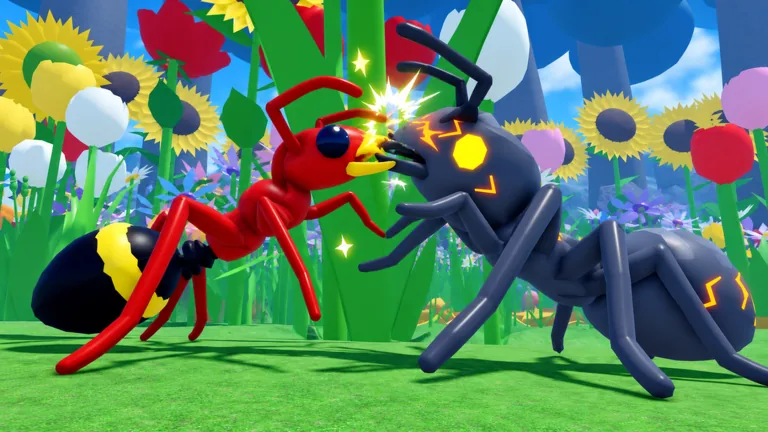
Your ant unlocks Bite and Roll after hatching into Larva, then gains different stage moves through evolution, according to the Ant Evolution Abilities and Controls Guide. The guide identifies Baby Ant with Pounce, Carpenter Ant with Leaf Shield, Soldier Ant with Charge, Trap-Jaw Ant with Jaw Snap, and Army Ant with Swarm; it also describes a close-range Sting move. Flight is separate: antevolution.org describes equipping Winged or owning Flying Wings as access routes, but its takeoff instructions conflict with the controls guide.
Quick reference
| Player goal | Action |
|---|---|
| Evolve when the XP bar is full | Press R, according to Sportskeeda. |
| Sprint | Press Left Shift, according to Sportskeeda. |
| Gain DNA for mutation rolls | Evolve and complete quests, according to Sportskeeda. |
| Find flight controls on mobile or controller | Use the displayed jump/flight and land buttons, according to antevolution.org. |
Which forms unlock each Ant Evolution ability?
Evolving into the required form unlocks its stage move, according to the Ant Evolution Abilities and Controls Guide, which lists these unlocks, buttons and effects.
| Ability | Unlock form | Controls | Effect or use according to the controls guide |
|---|---|---|---|
| Bite | Larva, after hatching | F or BITE | Separate close-range attack against bugs and other ants. |
| Roll | Larva | ROLL button | Early stage move replaced by Pounce at Baby Ant; the guide specifies no keyboard input. |
| Pounce | Baby Ant | Q or POUNCE while active | Replaces Roll; the button displays a countdown after use. |
| Leaf Shield | Carpenter Ant; also available to Leafcutter Ant | Q or SHIELD while active | Creates a transparent spherical shield around your ant; the button displays a countdown after use. |
| Charge | Soldier Ant | Q or CHARGE while active | Combat stage move; the button displays a countdown after use. |
| Jaw Snap | Trap-Jaw Ant | Q or SNAP while active | Stage move with a SNAP button; the button displays a countdown after use. |
| Sting | Not specified on the controls guide page | STING button | Requires proximity to an enemy; Swarm replaces it at the next evolution. |
| Swarm | Army Ant | Q or SWARM while active | Summons small red ants that gather around your character, follow you and assist in combat. |
According to the controls guide, Bite is separate from your stage move: move close to a target and press F or select BITE. The guide recommends checking the move button and any new-move notification after evolving, because Q activates the current Pounce, Leaf Shield, Charge, Jaw Snap or Swarm move rather than one permanent ability.
For Sting, the controls guide instructs you to approach an enemy and select STING; if a proximity prompt appears, move nearer. For Swarm, it recommends continuing to move and use Bite while the summoned ants follow, then waiting until the decreasing countdown returns to the normal move icon before using Swarm again.
How do you unlock flight and land again?
Equip the Rare Winged mutation or own the Flying Wings pass to access flight, according to antevolution.org’s flight guide. Its mutation instructions are to open MUTATE, roll until Winged is unlocked, and equip it in an active mutation slot; the guide describes Flying Wings as an alternative that does not use a mutation slot.
The guides disagree about keyboard takeoff. The Ant Evolution Abilities and Controls Guide says to press G to take off with Winged equipped, press Ctrl to descend, and press G again to land. By contrast, antevolution.org says to hold Space to take off and press G, or select LAND, to return to the ground. These conflicting reports do not establish which takeoff mapping is correct.
For mobile and controller, antevolution.org directs players to the displayed jump/flight and land buttons. If the flight prompt is missing, that guide recommends checking that Winged occupies an active slot in MUTATE, or checking STORE → PASSES for Flying Wings access. Follow the flight prompt displayed on your device rather than treating either guide’s takeoff key as settled.
How do you gain other abilities and use Pounce as a dodge?
Mutation rolls provide additional combat, utility and traversal effects, while Pounce can serve as a dodge, according to Sportskeeda’s beginner guide.
Sportskeeda describes collecting food to fill the XP bar, pressing R when it is full to evolve, and earning DNA through evolution and quests to spend on random mutation rolls in the Mutations menu. It describes mutations as equippable abilities, distinct from the moves gained through evolution.
For reaching new forms quickly, Sportskeeda recommends gathering food rather than relying on combat, which it describes as risky and time-consuming. Its controls list identifies Left Shift as sprint and F as Bite, while its combat advice notes that pouncing on enemies can also help you dodge.
Related Guides
Kill Now: Effects and Opponent-Level Prices
Explain the paid instant finish and compare its five price bands, attributed to the community wiki's 17 November 2026 catalog snapshot.
Ant Ladder: Form Order and How to Reach Ant Queen
List the 16 forms before rebirth unlocks and explain the recorded Power requirements for evolving from Titan Ant into Ant Queen.
Beginner Guide: Hatch, Grow and Evolve
Learn how to hatch your starting egg, fill each Power bar, reach your first ant forms and progress from Titan Ant to Ant Queen.